In engineering, some of the biggest productivity losses come from tasks nobody talks about.
Not complex calculations.
Not difficult designs.
But repetitive digital work done hundreds of times every year.
At our company, we had a workflow inside SolidWorks that engineers repeated constantly:
- Running Pack and Go
- Renaming files
- Updating project codes
- Changing custom properties
- Editing quantities
- Organizing folders
- Preparing deliverables for production
Each operation took few hours according to project size. But repeated around 10 times every week, it became a serious time drain.
So I decided to automate the entire process.
The Goal
The objective was simple:
Create a tool that allows colleagues to prepare an entire project package in seconds instead of manually editing dozens of files.
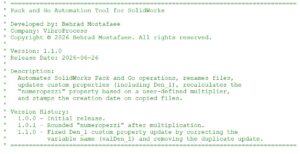
The result was a fully customized VBA (Visual basic application) integrated directly into SolidWorks.
The Interface
Here is the interface of the tool I developed:
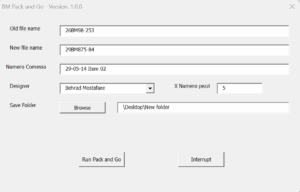
The UI was intentionally designed to be simple and practical for daily industrial use.
The user only needs to enter:
- Old file name
- New file name
- Job number
- Designer name
- Quantity multiplier
- Destination folder
Then the software handles everything automatically.
Behind this simple interface, the macro performs a surprisingly complex workflow.
Automatic Pack and Go Processing
The system:
- Detects the active top assembly
- Collects all referenced files
- Includes drawings automatically
- Excludes unnecessary library components
- Creates a clean project package
File Renaming
The macro searches through all assemblies, parts, and drawings and automatically replaces old file names with new ones. No manual renaming needed.
Smart Property Editing
The tool automatically updates custom properties like:
- Order number
- Number of pieaces
- Designer
- Creation date
One of the most useful features is the quantity processing logic.
The macro can:
- Detect numbers hidden inside mixed text
- Remove unwanted characters
- Convert decimal formats automatically
- Multiply quantities dynamically
- Apply updates across all configurations in assemblies
This solved many inconsistencies that existed in older projects.
Hidden Background Processing
Documents open silently in the background without interrupting the user.
This significantly improves speed and creates a much cleaner experience.
Safety Features
The software also includes:
- Validation checks
- Error handling
- Interrupt button
- Folder browser
- User selection dropdowns
- Cancellation support
These details are important because industrial tools must be reliable, not just functional.
The Real Impact
This automation completely changed the workflow inside our technical office.
Before
- Coupe of repetitive work every week
- Constant manual editing
- Risk of human errors
After
- just a 1 minute instead of 100
- One-click execution
- Standardized outputs
- Reliable documentation
- Reduced stress for me and colleagues
The productivity difference was massive.
Engineering Is Also About Process Optimization
Many people think engineering innovation only means designing machines.
But improving workflows can be equally valuable.
A well-designed internal tool can save hundreds of hours every year.
This project reminded me that engineers should spend their time solving technical problems — not renaming files manually for hours.
Final Thoughts
What started as a small internal VBA macro became one of the most useful tools inside our daily workflow.
Sometimes the best engineering improvements are not visible on the factory floor.
Sometimes they happen quietly inside the technical office, saving time, reducing errors, and making everybody’s work smoother.
— Behrad Mostafaee